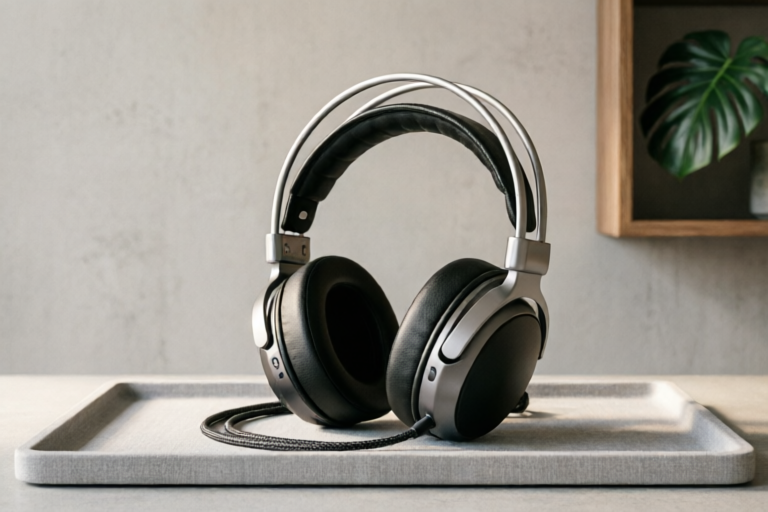
Best Gaming Headsets for Small Apartments and Quiet Living
Immersive Audio, Silent Respect
Introduction: Navigating the Noise Constraints of Apartment Living
In the modern digital landscape, gaming has evolved from a solitary hobby into a vibrant social experience. Whether you are coordinating a raid in a massive multiplayer RPG or competing intensely in a tactical shooter, communication is key. However, for millions of gamers residing in shared housing, condominiums, or thin-walled apartments, this connectivity comes with a significant caveat: noise management. The excitement of a close win or the frustration of an unexpected defeat can easily lead to raised voices, loud sound effects, and the thumping bass of video games escaping into the hallway or next door. Living in a compact space introduces unique acoustic challenges. Unlike a detached home where you have buffer zones between you and your surroundings, apartment living relies heavily on the structural integrity of shared walls, floors, and ceilings. Building acoustics often favor sound transmission, particularly in mid-range frequencies which human speech occupies and where many gaming soundtracks thrive. Furthermore, the psychological burden of being a "noisy neighbor" cannot be understated. Straining relations with roommates, family members, or distant landlords can lead to a tense home environment. Therefore, finding the right gaming hardware isn't just about audio fidelity; it is about preserving peace and maintaining respectful coexistence. This comprehensive guide aims to navigate these complexities. We will explore the technological nuances required to contain sound effectively, analyze the balance between performance and discretion, and provide practical lifestyle adjustments. Our goal is to help you find the perfect equipment that allows you to dominate the leaderboard while respecting the quietude of your living environment.Critical Design Features for Sound Containment
When selecting a headset specifically for quiet environments, aesthetic appeal and price point take a backseat to fundamental engineering design. Not all headsets are created equal regarding sound isolation. Understanding the physical mechanisms that prevent audio leakage is the first step toward a harmonious gaming setup.The Necessity of Closed-Back Ear Cups
The most critical determinant of sound containment is the design of the ear cups. Traditional open-back headphones are renowned for their superior soundstage and natural sound signature, allowing air to flow freely through the drivers. While audiophiles love open-back designs for precision mixing and spatial audio, they are disastrous for apartment living. Because there is no barrier between the driver and the listener's ears, sound escapes outward as easily as it enters inward. In a quiet apartment, a gaming opponent's footsteps, a subtle music track, or a dialogue line can bleed out through ventilation holes. Conversely, closed-back designs utilize solid plastic shells that encase the drivers completely. This creates a physical barrier that traps sound waves inside the ear cup. When choosing a headset for your apartment, prioritize models explicitly marketed as "closed-back." These designs rely on mass and sealing properties to minimize frequency leakage, ensuring that what happens in the game stays in the game.Plush Cushions and Secure Fit Mechanics
A sealed shell is insufficient without effective edge damping. Even with a closed-back design, gaps at the interface between the ear cup and the wearer's head allow sound to escape, especially louder bass frequencies. The cushion material plays a pivotal role here. Memory foam is often preferred over standard polyurethane because it molds to the shape of the ear and temple, reducing dead air gaps. Velour or cotton blends are breathable options that also seal well, whereas thick leather pads can sometimes slip against skin hair, breaking the seal. Moreover, the clamping force is crucial. A headset that is too loose will fail to isolate, but one that is too tight will cause fatigue during long sessions. High-quality apartment-focused headsets often feature adjustable headbands with spring-loaded tension or wide, padded band structures. Look for specifications mentioning "clamping pressure" or reviews that discuss the "seal." A secure fit ensures that the physical isolation matches the electronic performance.Driver Size and Power Handling
> While less obvious, driver size impacts potential volume levels. Larger drivers generally require less amplification to reach peak volumes compared to smaller ones. However, in the context of noise leakage, this is a double-edged sword. Larger cones moving more air create more external sound pressure if the seal isn't perfect. Opting for a headset with moderate driver sensitivity (typically around 90-100 dB/V) allows you to achieve clear audio without cranking the gain to maximum levels, thereby reducing the total acoustic energy emitted into the surrounding room.Active Noise Cancellation vs. Volume Limiting Technologies
Modern gaming peripherals often market two distinct technologies designed to manage volume perception: Active Noise Cancellation (ANC) and Volume Limiting/Parental Control software. Understanding the difference is essential for setting realistic expectations.Active Noise Cancellation: Blocking the Outside, Controlling the Inside
Traditionally, ANC is used to block external noise (like airplane engines) to help you hear audio at lower volumes. Does ANC reduce your audio leakage? Indirectly, yes. By canceling out background noises such as HVAC systems, traffic, or snoring roommates, you can focus on the game at a lower overall volume setting. If you don't need to raise your headset volume to drown out the world, your headset emits less sound externally. However, standard passive noise isolation (the physical seal discussed earlier) is still superior for containing your own game audio leakage. ANC microphones pick up internal sounds, but the effectiveness varies. Some gaming headsets integrate ANC chips specifically to enhance immersion. For a small apartment, the benefit is primarily enabling you to play at comfortable, conversational levels rather than shouting volumes. Be wary of headsets that use ANC solely for wireless microphone processing, as some feedback loops might introduce white noise which could leak through cracks in the earcup design.Software-Based Volume Limiting
Hardware controls are only half the battle. Many gaming headsets come with companion software (such as SteelSeries Sonar, Corsair iCUE, or HyperX NGENUITY) that offer granular volume control and limiting. Some of these apps include "Auto-Gain" features that normalize audio spikes. Imagine a sudden explosion in a game causing your system volume to jump 20dB. With auto-compression, the software dampens that spike automatically. This prevents those startling moments where the sheer blast of a virtual grenade forces you to rip the headset off, alerting everyone in the vicinity. Additionally, look for firmware updates that support "Quiet Mode" or preset profiles. These profiles can subtly roll off the high-frequency treble range, which tends to travel further through building walls than deep bass or mid-tones. This spectral shaping preserves the intelligibility of voice chat (essential for team coordination) while muting the piercing soundscapes that are most irritating to neighbors.Vibration Management
Another overlooked aspect of volume is vibration. Low-frequency bass causes the ear cushions and headband to vibrate physically. If these vibrations transfer to your desk or the wall behind you, they become mechanical transmission issues rather than air transmission issues. Active suspension technology found in high-end models can dampen these vibrations before they reach the chassis, reducing the likelihood of rattling windows or resonating through adjacent furniture.Recommended Headset Categories for Quiet Environments
Navigating the market requires categorizing choices based on budget and connection type. Here we break down the best options for different needs, focusing on models known for isolation and build quality.Budget-Friendly Wired Options
For those on a tight budget who refuse to compromise on silence, wired connections are the gold standard. Wireless signals introduce latency and often require compression algorithms that can degrade sound quality, prompting users to increase volume. Wired headsets bypass these issues. Look for budget brands like HyperX Cloud Stinger or Razer Kraken X variants. Specifically, seek out wired headsets with large, plush memory foam pads. These models typically lack the complex electronics of wireless variants, meaning less heat buildup and fewer components that could degrade the seal over time. A simple 3.5mm jack or USB-C connection ensures compatibility without needing dongles that sit on your desk and act as antennas for interference. The trade-off is mobility, but for a stationary desk setup in a small apartment, this is rarely an issue. The savings invested in a higher quality cable and better cushioning can outweigh the benefits of Bluetooth convenience.Premium Wireless Models with Transparency Modes
On the other end of the spectrum, premium wireless gaming headsets offer freedom of movement. Brands like Sony PlayStation Pulse or Logitech G Pro Wireless often excel in build quality. The standout feature for apartment dwellers in this category is "Transparency Mode" or "Ambient Passthrough" when listening to music or pausing the game. Why is this useful? If someone knocks on the door or your baby cries, you can instantly hear them without removing the headset. This encourages you to keep the headset on (for quick access) while still maintaining awareness of the household environment, preventing the need to shout commands when communicating with housemates. Furthermore, premium models usually feature better battery life and superior codec support (LDAC or aptX), ensuring that even when playing wirelessly, the audio remains clear enough to avoid volume boosting. Many high-end models also include dedicated EQ sliders via the headset button matrix. Being able to dial down the bass immediately saves battery power and reduces leakage simultaneously. While pricier, the investment in a flagship model pays dividends in comfort over long night sessions and superior acoustic engineering that naturally suppresses leakage more effectively than cheaper alternatives.Mix-and-Match Solutions
An emerging trend involves buying separate components. Purchasing high-quality studio monitor headphones (designed for mixing, not necessarily gaming features) combined with a good boom microphone offers exceptional isolation. Studio headphones are almost exclusively closed-back and optimized for accuracy. Adding a separate USB mic allows for clear voice communication without relying on the headset's poor internal microphone, which often compromises the audio seal. This modular approach gives you the best possible sound isolation from the headphone side while optimizing voice quality for your teammates.Lifestyle Adjustments to Complement Hardware Choices
Even the best headset cannot solve every acoustic problem if the surrounding environment contributes to noise propagation. Integrating hardware choices with lifestyle habits creates a holistic quiet living strategy.The Late-Night Mute Button Strategy
Most gaming headsets feature a physical mute switch on the ear cup. Establish a personal rule: anytime you enter voice comms late at night (after 10 PM), activate the mute function when not actively speaking. Background noise such as keyboard clicks, mouse clicks, or breathing can be picked up by sensitive gaming mics and transmitted to others. Additionally, some headsets have a "sidetone" feature. Turning this down or off prevents you from hearing your own voice amplified, which can tempt you to speak louder. Lowering your voice naturally lowers the output volume needed for you to hear yourself.Strategic Desk Placement
Consider where your desk sits relative to shared walls. Ideally, place your desk perpendicular to shared boundaries, not parallel. Parallel placement aligns the flat surface of your speakers or headrest against the shared wall, acting like a megaphone. Placing the desk against a non-shared wall or using a bookshelf as a buffer zone adds mass between you and the neighbors. Additionally, placing your headset charger or stand on a rug instead of a hard floor reduces transmission of the vibration caused by plugging in cables or adjusting the device.Soft Foam Pads and Accessories
If your current headband leaks sound at the crown, consider aftermarket upgrades. Soft foam covers for the headband can absorb vibrations that bounce off the top of your skull. Similarly, adding an extra layer of felt padding inside the ear cups can tighten the seal without sacrificing comfort. This DIY approach is cost-effective and can extend the life of your existing headset's ability to silence its content.Time Management and Community Etiquette
Finally, communication is paramount. Inform your neighbors and housemates of your gaming schedule. "I'm running a ranked match from 8 PM to midnight tonight" sets expectations. During scheduled downtime, agree on a "quiet hour" where heads-down is respected. This courtesy goes a long way in mitigating friction. Most neighbors appreciate the transparency. If you treat the noise issue as a collaboration rather than a nuisance, the atmosphere shifts from adversarial to cooperative.Final Verdict: Choosing Your Perfect Low-Profile Companion
Selecting the ideal gaming headset for small apartment living requires a delicate balance between performance, silence, and comfort. There is no single "magic bullet," but the path forward is clear: prioritize closed-back designs, maximize passive isolation through fit and materials, and leverage software tools to manage dynamic range. For the budget-conscious gamer, a sturdy, wired closed-back model with ample memory foam padding provides 90% of the acoustic isolation benefits at a fraction of the cost. It removes the complexity of battery management and focuses on core functionality. For the premium enthusiast, a wireless model with advanced ANC and transparency modes offers the flexibility to manage both game audio and real-world sounds seamlessly, provided you invest in a model known for excellent build sealing. Ultimately, the best tool is the one that fits your lifestyle. A gaming headset that respects the rights of others allows you to game later without fear, relax without guilt, and immerse yourself fully without distraction. Remember, the ultimate goal is not just to hear the game clearly, but to hear the peace of your home clearly too. By combining thoughtful hardware selection with mindful room practices, dedicated gamers in close quarters can enjoy the thrill of the digital battlefield while maintaining the tranquility of their sanctuaries. Choose wisely, adjust carefully, and game on responsibly.Comments

+1 on the soft foam tips idea. Also putting my desk away from the shared wall really helps with vibrations. Good advice!

Worth the extra cash for the ANC? I mainly just need isolation from my own game sounds so I don't crank the volume up.

This article saved me tbh. Been using my current headset which sounds like speakers. Ordering the Sony Prolistens now.

Tried the budget option and honestly disappointed. Still hear bass vibrating through the wall. Might need to upgrade to the closed-back listed here.
Anyone know if the premium wireless model works well with PC dongle mode? Just worried about latency keeping me awake at night.

Finally found a pair that doesn't leak sound! My downstairs neighbor stopped complaining after a week. Totally worth the switch from my old open-back ones.