Gaming & Entertainment
Best Wireless Gaming Headphones For Beginners In 2024
Connect Without Compromise. Play Without Limits.
# Best Wireless Gaming Headphones For Beginners In 2024
## Introduction: The Appeal of Wireless Audio for New Gamers
The landscape of video gaming has evolved dramatically over the last decade, transitioning from static setups tethered by cables to dynamic experiences defined by mobility and immersion. For beginners entering the world of gaming in 2024, the decision between wired and wireless audio equipment is one of the most critical choices they will make. While traditional wired headsets have long been the gold standard for competitive play due to their reliability, the wireless technology available today has closed the gap significantly. This shift represents more than just convenience; it symbolizes freedom.
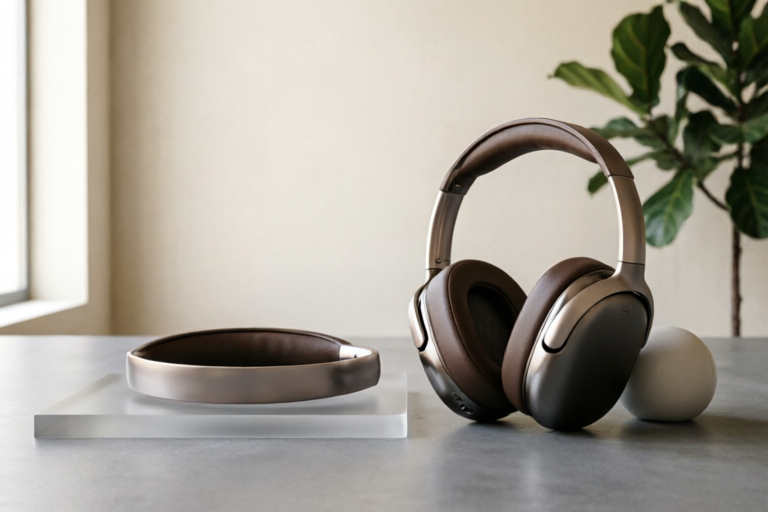
For a new gamer, the primary appeal of wireless audio lies in the elimination of physical constraints. Imagine setting up your battle station or relaxing in a comfortable chair after a long day at work. Cables dragging across the floor, tangling with desk legs, or getting caught in chairs create visual clutter and potential trip hazards. Wireless headsets solve this aesthetic problem instantly, creating a clean, organized environment that enhances the overall atmosphere of the gaming setup. Furthermore, the lack of restriction allows players to stand up, stretch, grab a drink, or move slightly away from their monitor without pausing the game or risking damage to their hardware. This fluidity improves immersion, allowing the player to feel less restricted by their peripherals and more focused on the virtual world.
Beyond aesthetics, there is a practical benefit regarding wearability. Many modern gaming headsets are designed with lighter materials specifically to accommodate the wireless form factor while maintaining durability. This makes long gaming sessions significantly more comfortable compared to some heavier, wired alternatives that rely on thick copper wiring for connectivity. As we delve deeper into this guide, we will explore how to choose the right device that balances this newfound freedom with the technical performance required for serious gaming.
## Essential Features to Prioritize When Choosing a Headset
Selecting a wireless gaming headset involves more than just picking a brand you recognize. There are several technical specifications that directly impact the gameplay experience. For beginners, understanding these core metrics is vital to avoid purchasing a product that underperforms or causes frustration later on.
### Battery Life and Charging Technology
One of the most common concerns regarding wireless devices is power. In the context of gaming, where sessions can extend from four to ten hours, a headset that dies halfway through a campaign is a major inconvenience. When shopping in 2024, look for headsets that offer a minimum of 20 hours of continuous playback on a single charge. Some premium models even boast up to 50 hours, which effectively bridges the gap between weeks of play. Fast charging capabilities are also a crucial feature. A feature that provides five hours of listening time from just a ten-minute charge can save your session when you accidentally leave your headset plugged out overnight.
### Zero-Latency Connection
Latency refers to the delay between the audio being produced in the game and what you hear in your ears. In multiplayer shooters like Call of Duty or Valorant, split-second hearing—such as footsteps—is life-or-death. While Bluetooth technology has improved, it still often introduces slight latency. Therefore, most dedicated gaming wireless headsets utilize a proprietary 2.4GHz USB receiver rather than standard Bluetooth. This method creates a direct, encrypted connection with near-zero perceptible lag. Beginners should prioritize headsets that explicitly advertise a zero-latency connection or ultra-low latency transmission to ensure they don't miss tactical audio cues.
### Comfort for Long Sessions
Gaming is often a marathon, not a sprint. If your headset hurts after an hour, you won't enjoy your hobby. Key factors here include weight distribution, clamping force, and ear cup material. Look for memory foam ear cushions that conform to the shape of your ears, providing excellent sound isolation without pressing too hard against your skull. Over-ear designs generally offer better isolation than on-ear models, protecting you from external noise. Additionally, a breathable leatherette or mesh fabric helps prevent heat buildup and sweating, which is a common complaint during intense summer gaming months.
### Microphone Clarity
Multiplayer gaming is inherently social. The ability to communicate clearly with teammates via voice chat is non-negotiable. Do not overlook the microphone specs. Look for omnidirectional microphones that capture your voice evenly regardless of your distance from the boom arm. Noise cancellation is another essential feature; it filters out background noises like keyboard typing, fan hum, or street traffic, ensuring that your teammates only hear your commands, not the chaos of your room. Some headsets also offer detachable microphones for privacy when you want to listen to music without broadcasting your presence.
## Top Recommended Wireless Gaming Headphones for 2024
To simplify the purchasing process, we have curated a list of top-tier recommendations categorized by budget tiers. These selections represent the best balance of price, performance, and feature sets currently available on the market.
### Budget Tier: HyperX Cloud Flight Wireless
HyperX has long been a staple in the budget-friendly gaming category, and the Cloud Flight Wireless continues this legacy. It offers an impressive feature set for its price point, making it an ideal entry-level choice.
* **Pros:** Features a removable lithium-ion battery pack for extended playtime (up to 30 hours). The audio signature is balanced with clear highs and punchy bass. It includes a detachable noise-canceling microphone.
* **Cons:** The build is primarily plastic, which feels slightly less premium than higher-end rivals. The software support is minimal compared to competitors like Logitech.
### Mid-Range Tier: Logitech G Pro X Superlight 2 Wireless
Moving up to the mid-range, the Logitech G Pro X Superlight 2 stands out as a favorite among esports enthusiasts. It prioritizes pure audio performance and connectivity over flashy RGB lighting.
* **Pros:** Utilizes LOGITECH LIGHTSPEED wireless technology for true zero-latency. It is incredibly lightweight, reducing fatigue during long sessions. The DTS Headphone:X Spatial Audio provides precise positional audio for competitive games.
* **Cons:** The price point is higher, potentially exceeding the budget of a strict beginner. Ear cups may feel small for users with larger heads.
### Premium Tier: SteelSeries Arctis Nova Pro Wireless
For those willing to invest in the best possible experience, the SteelSeries Arctis Nova Pro Wireless offers industry-leading versatility and premium build quality.
* **Pros:** Features dual-battery system allowing continuous swappable charging (one charges while the other plays). It supports simultaneous connection to two platforms (e.g., PC and PlayStation) at once. The audio is Hi-Res certified with incredible clarity.
* **Cons:** Significantly expensive. The heavy weight and complex button layout may be overwhelming for a total novice who wants simplicity.
## Ensuring Cross-Platform Compatibility and Connectivity
One of the most confusing aspects of buying a wireless headset is connectivity. Not all wireless protocols work across all devices. Understanding the difference between Bluetooth and 2.4GHz USB Dongle connections is essential for ensuring compatibility with your specific console or PC.
### Bluetooth vs. USB Dongle
Most modern consumer headphones rely on Bluetooth, which is versatile but historically limited in gaming due to latency issues. However, some newer gaming headsets are adopting Bluetooth Low Energy. Despite this, for high-performance gaming, the USB Dongle (2.4GHz transmitter) remains king.
* **PC Gaming:** Almost any wireless headset will work via USB Dongle on PC. Bluetooth is supported but recommended primarily for music or media consumption rather than competitive FPS gaming.
* **PlayStation (PS5/PS4):** PlayStation consoles fully support standard Bluetooth headsets, meaning you can connect almost any Bluetooth gaming headset wirelessly. However, for the lowest latency, many gamers prefer using the specific wireless dongle included with headsets designed for PS5, like the Pulse Elite.
* **Xbox (Series X|S):** Xbox has unique restrictions. Due to proprietary encryption standards, Xbox does not support standard Bluetooth for audio input/output in the same way. You generally need a headset with a dedicated Xbox wireless protocol dongle or a compatible USB receiver to ensure functionality on Xbox.
* **Nintendo Switch:** The Switch is flexible. It accepts 2.4GHz dongles (via USB port or jack adapter) and Bluetooth 5.0 headsets. If playing in handheld mode, Bluetooth is convenient, but docked, a dongle provides more stability.
### Multi-Device Pairing
In 2024, a seamless workflow often requires switching between a desktop PC and a mobile phone, or between a TV console and a laptop. High-end wireless headsets now feature "Dual Link" capabilities. This allows you to pair with both devices simultaneously. For example, you can receive a call on your phone connected to the headset while gaming on your PC, then answer immediately without losing your place in the game. When choosing a headset, verify if the model supports this multi-device pairing to future-proof your investment.
## Conclusion: Final Buying Advice and Maintenance Tips
Choosing the right wireless gaming headset is an investment in both your comfort and your performance. For the average beginner, we recommend starting with the mid-range segment of the market. The Logitech G Pro X series or similar mid-tier options offer the perfect balance between cost and capability without sacrificing the essential zero-latency audio quality that matters in competitive play.
Before finalizing your purchase, always check which platform you plan to use most often. While PC has the fewest restrictions, console-specific licensing can limit your options. Read recent reviews to ensure firmware updates haven't introduced bugs, as wireless tech relies heavily on software optimization.
### Maintenance Tips for Longevity
Once you have acquired your new headset, maintaining it ensures it lasts for years:
1. **Charging Habits:** Avoid draining the battery to 0% constantly. Lithium-ion batteries perform best when kept between 20% and 80%. Try not to leave the headset plugged in indefinitely after it reaches 100% for days at a time.
2. **Cleaning:** Dust and oils accumulate in the ear pads. Wipe them down weekly with a microfiber cloth dampened with water or alcohol-free disinfectant. This prevents skin irritation and keeps the material supple.
3. **Storage:** When not in use, store the headset in a protective case or hang it up. Do not throw it into a bag where the wires (even if wireless, there are internal connectors) or the ear cups could get crushed. Proper storage prevents spring tension loss in the headband.
4. **Firmware Updates:** Periodically check the manufacturer's app for firmware updates. These often improve battery efficiency, fix latency drops, or add new equalizer presets.
By following this guide, you ensure that your journey into wireless gaming begins with clarity, comfort, and confidence. Happy gaming.
Comments

StartUpGaming
Ordered the recommendation for pc gamers today. Cant wait to try zero latency.
👍 2👎 0

ProTipsOnly
Good advice on storing them properly. Mine used to crack because i didn't wrap it right.
👍 9👎 0

FrustratedFan
Can someone explain the difference between bt and usb dongle again? im still confused.
👍 13👎 0

RetroVibes
Switched from a wired hyperx. Sound is decent enough, love the freedom though.
👍 9👎 0
SleepyShooter
Battery life is the biggest sell for me. Woke up today, headset still had 40% charge from last week.
👍 19👎 0

BudgetKing
The budget section was super helpful. Didn't want to overspend before knowing if i'd actually use it.
👍 25👎 0
QuesTy_Queen
Does the USB receiver work fine on xbox series x or is it limited?
👍 7👎 0

GamerDude88
Finally got wireless, no more cable snags during fights lol. Worth the upgrade for sure.
👍 19👎 0